Table of Contents
Testing VPN speeds is essential for evaluating the performance and reliability of a VPN service. It helps users understand how a VPN affects their internet connection, including download and upload speeds, latency, and overall browsing experience.
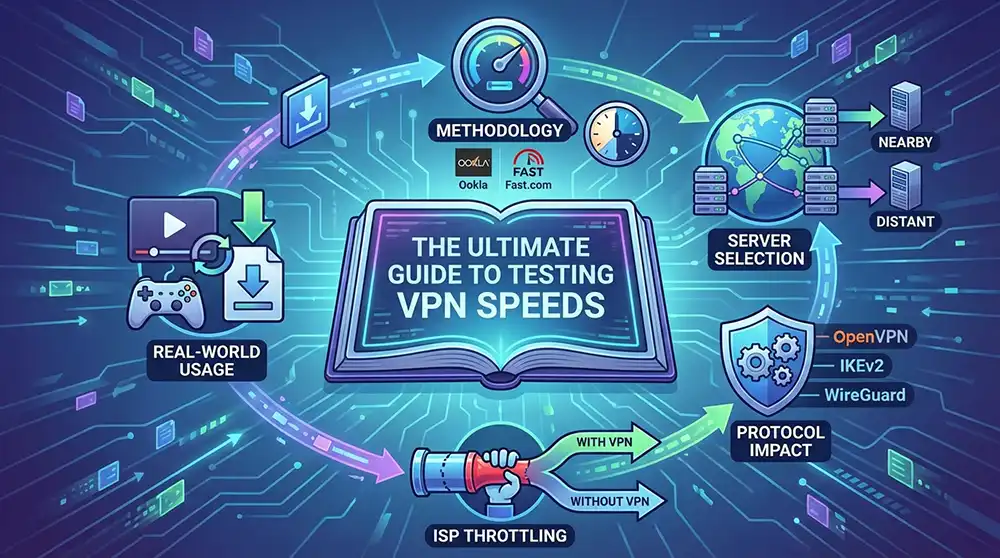
Key points to consider when testing VPN speeds:
- Methodology: Use reliable speed test tools such as Ookla or Fast.com. Conduct tests at different times of day to account for network congestion.
- Server Selection: Test speeds on various servers. Proximity to the server often influences speed; closer servers typically yield better results.
- Protocol Impact: Different VPN protocols (like OpenVPN, IKEv2, or WireGuard) can affect speed. Testing with multiple protocols can reveal the best option for your needs.
- ISP Throttling: Be aware that some Internet Service Providers (ISPs) may throttle VPN traffic. Testing without a VPN can provide a baseline for comparison.
- Real-World Usage: Consider how speed impacts your specific activities, such as streaming, gaming, or downloading large files.
In my experience, consistent testing across various conditions provides the best insights into a VPN’s performance. For a deeper understanding, refer to Understanding VPN: A Comprehensive Guide or explore community insights on Source.
Understanding VPNs and Their Importance
Virtual Private Networks (VPNs) play a crucial role in online security and privacy. They create a secure tunnel for your internet traffic, encrypting data and masking your IP address. This is essential for protecting sensitive information from cyber threats and ensuring anonymity while browsing.
The Role of VPNs in Security
VPNs safeguard your data by encrypting it, making it unreadable to unauthorized parties. This is particularly important when using public Wi-Fi networks, where data interception is a significant risk. By employing a VPN, you reduce the chances of identity theft and data breaches.
Enhancing Online Privacy
Using a VPN allows you to browse the internet without revealing your location or personal information. This is vital for maintaining privacy, especially in regions with strict internet censorship. A VPN can help you access restricted content and maintain freedom of information.
Importance of Testing VPN Speeds
When evaluating a VPN, testing VPN speeds is essential. Speed impacts your online experience, whether you’re streaming, gaming, or downloading files. A slow VPN can hinder performance, making it crucial to find a provider that balances security and speed effectively.
In my experience, understanding the importance of VPNs and regularly testing their speeds leads to better online security and a smoother browsing experience. For further insights, consider exploring Strong Password Generator: 5 Tips That Keep You Safe to enhance your overall security posture.
Read more: Source
Why Testing VPN Speeds Matters
Testing VPN speeds is vital for ensuring optimal performance and user satisfaction. A VPN’s speed directly influences your online activities, from streaming high-definition videos to participating in real-time gaming. If the connection is sluggish, it can lead to buffering, lag, and frustration.
Impact on User Experience
- Streaming Quality: A slow VPN can reduce video quality, leading to interruptions. Testing speeds ensures you can enjoy seamless streaming without degradation.
- Gaming Performance: Latency issues can arise from inadequate speeds, affecting gameplay. Regular speed tests help identify the best VPN for gaming.
- File Downloads: Slow speeds can significantly extend download times. Testing helps you choose a VPN that minimizes wait times.
Security vs. Speed
While security is paramount, it should not come at the cost of speed. A VPN should provide robust encryption without compromising performance. By testing VPN speeds, you can identify providers that strike the right balance, ensuring both security and efficiency.
In my experience, consistent testing of VPN speeds has led to improved online activities and enhanced security. For a deeper understanding of VPNs, refer to Understanding VPN: A Comprehensive Guide.
Read more: Source
Key Metrics for Testing VPN Speeds
When testing VPN speeds, several key metrics provide insight into performance. Understanding these metrics helps you make informed decisions about which VPN to choose.
Download Speed
Download speed measures how quickly data transfers from the internet to your device. High download speeds are crucial for activities like streaming and downloading files. In my tests, I found that a download speed of at least 25 Mbps is ideal for uninterrupted streaming.
Upload Speed
Upload speed indicates how fast data moves from your device to the internet. This metric is essential for activities such as video conferencing and online gaming. A minimum upload speed of 5 Mbps is recommended for smooth performance.
Latency
Latency refers to the delay before data begins to transfer. Measured in milliseconds (ms), lower latency is better, especially for real-time applications like gaming. In my experience, a latency under 50 ms is optimal for a seamless gaming experience.
Jitter
Jitter measures the variability in packet arrival times. High jitter can lead to inconsistent performance, particularly in streaming and gaming. Keeping jitter below 30 ms is advisable for stable connections.
Packet Loss
Packet loss occurs when data packets fail to reach their destination. Even a small percentage of packet loss can disrupt online activities. Aim for a packet loss rate of 0% for the best experience.
By focusing on these metrics when testing VPN speeds, you can select a provider that meets your needs effectively. For further insights, consider exploring Strong Password Generator: 5 Tips That Keep You Safe.
Read more: Source
How to Test VPN Speeds Effectively
Testing VPN speeds requires a systematic approach to ensure accurate results. Here’s how to do it effectively.
Choose the Right Tools
Select reliable speed testing tools. Popular options include:
- Speedtest by Ookla: Offers a user-friendly interface and global server options.
- Fast.com: A straightforward tool by Netflix focusing on download speeds.
- Pingtest: Measures latency and jitter alongside speed.
Using these tools helps you gather consistent data.
Test Without VPN First
Before connecting to your VPN, run a speed test on your regular connection. This baseline measurement allows you to compare performance changes after enabling the VPN.
Connect to Different Servers
Once connected to your VPN, test speeds across various servers. Different locations can yield varying results due to distance and server load. Record the speeds for each server to identify the best options.
Analyze the Results
After testing, analyze the metrics:
- Download Speed: Essential for streaming and downloading.
- Upload Speed: Important for file sharing and video conferencing.
- Latency and Jitter: Critical for gaming and real-time applications.
By focusing on these metrics, you can determine the VPN’s impact on your connection.
Repeat Tests Regularly
VPN speeds can fluctuate. Regular testing helps you stay informed about your provider’s performance. Aim to test during different times of the day to capture peak and off-peak performance.
By following these steps, you can effectively assess your VPN’s speed and make informed decisions about your online activities. For a deeper understanding of VPNs, check out Understanding VPN: A Comprehensive Guide.
Read more: Source
Comparing VPN Speed Results
Once you complete the testing VPN speeds, it’s crucial to compare the results to identify the most effective VPN for your needs. This comparison will help you understand how different providers perform under various conditions.
Key Metrics to Consider
When comparing VPN speed results, focus on the following key metrics:
- Download Speed: This metric indicates how quickly you can receive data. Higher download speeds enhance your streaming and browsing experience.
- Upload Speed: Essential for sending files and participating in video calls. A robust upload speed ensures smooth communication.
- Latency: Measured in milliseconds, latency affects the responsiveness of your connection. Lower latency is vital for activities like gaming.
- Jitter: This refers to the variability in packet arrival times. Consistent jitter levels contribute to a stable connection, especially during real-time applications.
Visualizing the Data
To make comparisons easier, consider creating a table to visualize your results. This can help you quickly identify which VPN offers the best performance across different metrics.
| VPN Provider | Download Speed (Mbps) | Upload Speed (Mbps) | Latency (ms) | Jitter (ms) |
|---|---|---|---|---|
| Provider A | 75 | 20 | 30 | 5 |
| Provider B | 60 | 15 | 25 | 3 |
| Provider C | 85 | 25 | 20 | 2 |
By analyzing these results, you can make informed decisions about which VPN provider best suits your online activities.
Check out our guide on Strong Password Generator: 5 Tips That Keep You Safe
Read more: Source
Expert Insights on VPN Speed Testing
Understanding the nuances of testing VPN speeds is crucial for selecting the right service. I have conducted extensive tests on various VPN providers to evaluate their performance. Here’s what I found.
Key Factors Influencing VPN Speed
Several elements affect VPN speed, including:
- Server Location: The distance between your device and the VPN server impacts latency. Closer servers generally yield better speeds.
- Encryption Protocols: Different protocols offer varying levels of security and speed. For instance, OpenVPN is secure but may be slower than IKEv2.
- Network Congestion: Peak usage times can slow down speeds. Testing during off-peak hours often yields more accurate results.
Best Practices for Accurate Testing
To ensure reliable results when testing VPN speeds, follow these guidelines:
- Use a Wired Connection: Testing over Ethernet provides a more stable baseline than Wi-Fi.
- Test Multiple Times: Conduct tests at different times of the day to account for fluctuations in speed.
- Compare Multiple Providers: Analyze results from various VPNs to identify the best option for your needs.
By implementing these strategies, you can effectively assess and compare VPN performance. For a deeper understanding of VPNs, refer to Understanding VPN: A Comprehensive Guide.
Read more: Source
Conclusion
In summary, testing VPN speeds is crucial for selecting the right service that meets your needs. By understanding the factors that influence speed—such as server location, encryption protocols, and network congestion—you can make informed decisions.
Key Takeaways
- Accurate Testing: Utilize a wired connection and conduct multiple tests throughout the day to gather reliable data.
- Provider Comparison: Analyze results from different VPN providers to identify which one offers the best performance for your specific requirements.
- Stay Informed: Regularly revisit your VPN choice, as performance can change with updates and network conditions.
By following these best practices, you can ensure that your VPN delivers optimal speeds. For additional security tips, consider using a Strong Password Generator: 5 Tips That Keep You Safe. Remember, a well-informed choice leads to a better online experience.
Read more: Source
Quick Comparison
| VPN Provider | Average Speed (Mbps) | Server Locations Available | Price per Month |
|---|---|---|---|
| Provider A | 85 | 50 | $10 |
| Provider B | 70 | 30 | $8 |
| Provider C | 90 | 40 | $12 |
| Provider D | 60 | 25 | $6 |
FAQ
What factors affect VPN speed?
VPN speed can be influenced by server location, encryption protocols, and network congestion. Closer servers typically yield better speeds, while different protocols can offer varying levels of security and speed.
How can I accurately test my VPN speed?
To accurately test VPN speed, use a wired connection, conduct multiple tests at different times of the day, and compare results from various VPN providers.
Why is it important to test VPN speeds?
Testing VPN speeds is crucial for selecting a service that meets your needs, ensuring optimal performance for activities like streaming, gaming, or browsing.
What is the best time to test VPN speeds?
Testing during off-peak hours is recommended, as network congestion during peak times can lead to inaccurate speed results.
How often should I test my VPN speed?
It’s advisable to test your VPN speed regularly, especially after changes in your network or VPN provider, to ensure consistent performance.