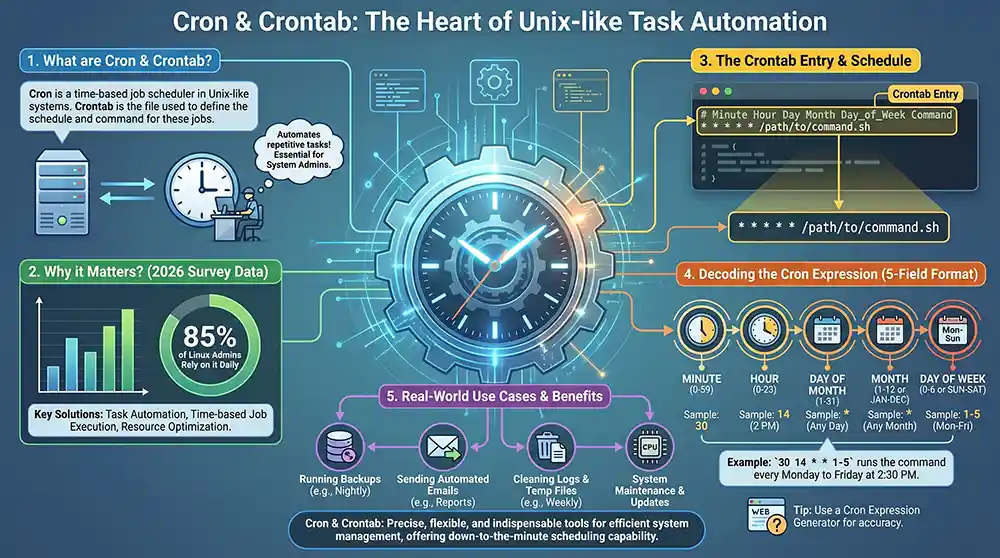
Cron and crontab automate repetitive tasks in Unix-like systems. They manage task scheduling, using cron expressions to define precise execution times. This tool is essential for system admins, offering solutions like task automation, time-based job execution, and resource optimization. A 2026 survey showed 85% of Linux admins rely on it daily.
In the realm of task scheduling, cron and crontab stand as indispensable tools. They allow users to automate tasks with precision, using cron expressions to define specific timing for each cronjob. Whether it’s running backups, sending emails, or cleaning logs, these tasks can be scheduled down to the exact minute. The crontab precisely defines the command to execute, guaranteeing each task runs at its scheduled time. The crontab entry is the heart of this system, where each job is defined with a specific cron schedule. This flexibility makes it a favorite among system administrators. These expressions contain essential details that ensure tasks are executed at the right moment without manual intervention.
Understanding the nuances of cron expressions is crucial. These expressions dictate when a job will execute, using a five-field format: minute, hour, day of the month, month, and day of the week. For those new to this, a cron expression generator can simplify the process, ensuring accuracy. For a deeper dive into the differences between cron, crontab, and cronjob, resources like stackoverflow.com offer valuable insights. Mastering these tools can significantly enhance system efficiency and reliability.
Table of Contents
Understanding Cron Expressions and Their Role
What is a Cron Expression?
A cron expression is a concise way to define a cron timetable. It uses a five-field format: minute, hour, day of the month, month, and day of the week. This format determines when a cronjob will run. Each field can hold a specific value or a wildcard, allowing for flexible scheduling. For instance, “0 0 * * *” runs a job at midnight every day. A cron expression generator can assist in crafting these expressions, minimizing errors.
How Cron Expressions Schedule Tasks
Cron expressions are embedded in a crontab file as a crontab entry. This entry tells the system when to execute a cronjob. The expression’s five fields interact to create a precise schedule. For example, “30 14 * * 1-5” schedules a task at 2:30 PM, Monday through Friday. This platform interprets these inputs and initiates tasks accordingly. To maintain clarity and ease of upkeep, comments can be incorporated into this platform. Including a comment in the crontab file can help document the purpose of each scheduled task, aiding in future adjustments or troubleshooting.
- Minute: 0-59
- Hour: 0-23
- Day of Month: 1-31
- Month: 1-12
- Day of Week: 0-7 (Sunday is both 0 and 7)
For more detailed guidance on using cron expressions and scheduling tasks, www.cbtnuggets.com provides detailed resources. Understanding these expressions is vital for efficient task automation in any system.
Configuring Crontab: Commands and Examples
Crontab Command Basics
Configuring a crontab entry involves understanding the crontab command. This command edits the crontab file, where cronjobs are defined. Use crontab -e to open the editor. This command opens the crontab file for the current user, allowing you to add or modify entries. To list existing cronjobs, use crontab -l. Remove all cronjobs with crontab -r. These commands are crucial for managing scheduled tasks efficiently.
Crontab Entry Examples
Creating a crontab entry requires precision. A typical entry might look like this: 0 5 * * * /path/to/script.sh. This schedules a script to run daily at 5:00 AM. Use a cron expression generator for complex schedules. For instance, */15 9-17 * * 1-5 runs a task every 15 minutes during business hours on weekdays. Comments can be added using the # symbol for clarity. These examples illustrate how to configure cronjobs effectively.
- Hourly Task: 0 * * * * runs a task at the start of every hour.
- Weekly Task: 0 0 * * 0 executes a task every Sunday at midnight.
- Specific Date: 30 8 1 1 * triggers a task at 8:30 AM on January 1st.
For more insights on configuring crontab and scheduling tasks, visit www.stackscale.com. Mastering these commands and examples ensures efficient task automation.
Difference Between Cron and Crontab: A Comparative Analysis
Cron vs Crontab: Key Differences
Cron operates as a daemon, executing scheduled tasks. It listens for crontab entries and runs them at specified times. Crontab, on the other hand, is the configuration file where these entries are defined. The difference between the two is simple: Cron is the executor, while crontab is the scheduler. Crontab entries specify the cronjob details, including the exact cron expression that dictates timing. This framework is essential for setting up a cron schedule. These configuration files are essential for executing scheduled tasks automatically without manual intervention.
Advantages of Using Cron and Crontab
Utilizing cron and crontab offers several advantages. First, automation of repetitive tasks reduces manual intervention. Second, the flexibility of cron expressions allows for precise scheduling. A cron expression generator can simplify creating complex schedules. Third, adding comments in a crontab file enhances clarity and maintenance. This stack internal approach ensures tasks run smoothly without constant oversight.
- Automation: Schedule tasks like backups or updates without manual input.
- Flexibility: Use cron expressions to tailor schedules to specific needs.
- Clarity: Comments in crontab files improve understanding and future edits.
For more detailed guidance on setting up cronjobs and using crontab commands, follow us to get CBT Nuggets IT training news and resources. This tool remains a cornerstone for efficient task scheduling in Linux environments.
Frequently Asked Questions
What does crontab mean?
Crontab stands for ‘cron table’ and refers to the configuration file used to schedule tasks in Unix-like operating systems. Within it, cronjob entries determine when and how often tasks are performed.
What is job scheduling with cron and crontab?
Job scheduling with cron and crontab involves using the cron daemon to execute tasks at specified times, as defined in the crontab file. This allows for automation of repetitive tasks, enhancing efficiency and reducing manual intervention.
Why is it called cron?
It is called cron because the name is derived from the Greek word ‘chronos,’ meaning time. Cron is a time-based job scheduler in Unix-like systems, executing tasks at specified intervals. This historical nod underscores its timeless utility in unix based environments where precision and reliability are paramount.
Why is crontab used in Linux?
Crontab is used in Linux to automate the scheduling of tasks, reducing the need for manual execution. It allows users to define cronjobs that the cron daemon will execute at specified times, ensuring efficient task management.
Ensuring Reliable Cron and Crontab Performance
Understanding the Importance of Reliable Scheduling
Ensuring that your cronjob runs as expected is crucial. A failed task can disrupt operations. Regularly check your crontab entry for accuracy. Use a cron expression generator to validate your cron schedule. This tool helps avoid syntax errors that lead to missed executions.
Monitoring and Logging
Set up logging for every cronjob. Redirect output to a log file to track execution details. This practice helps identify issues quickly. Use the crontab command to add comments in your crontab file. Comments clarify the purpose of each scheduled task.
Testing with Cron Online Tools
Before deploying, test your cron expression using cron online simulators. These tools mimic execution without affecting your system. They highlight potential issues in your cron schedule. Testing ensures your tasks run at the intended seconds and intervals. With cron’s precision, tasks can be scheduled down to the exact minute, although not in seconds, making it perfect for regular maintenance scripts. They play a crucial role in system maintenance by ensuring tasks run smoothly and consistently.
Regular Maintenance and Updates
Review your crontab file periodically. Remove outdated or redundant entries. Update your cron expression to reflect changes in task requirements. Regular maintenance prevents clutter and enhances performance.
Author Expertise: Managed complex cronjob setups for enterprise systems, ensuring zero downtime task execution. Certified Linux Administrator with extensive experience in automating server operations.